Best vectorizer for laser cutting and Cricut: 8 tools compared (2026)
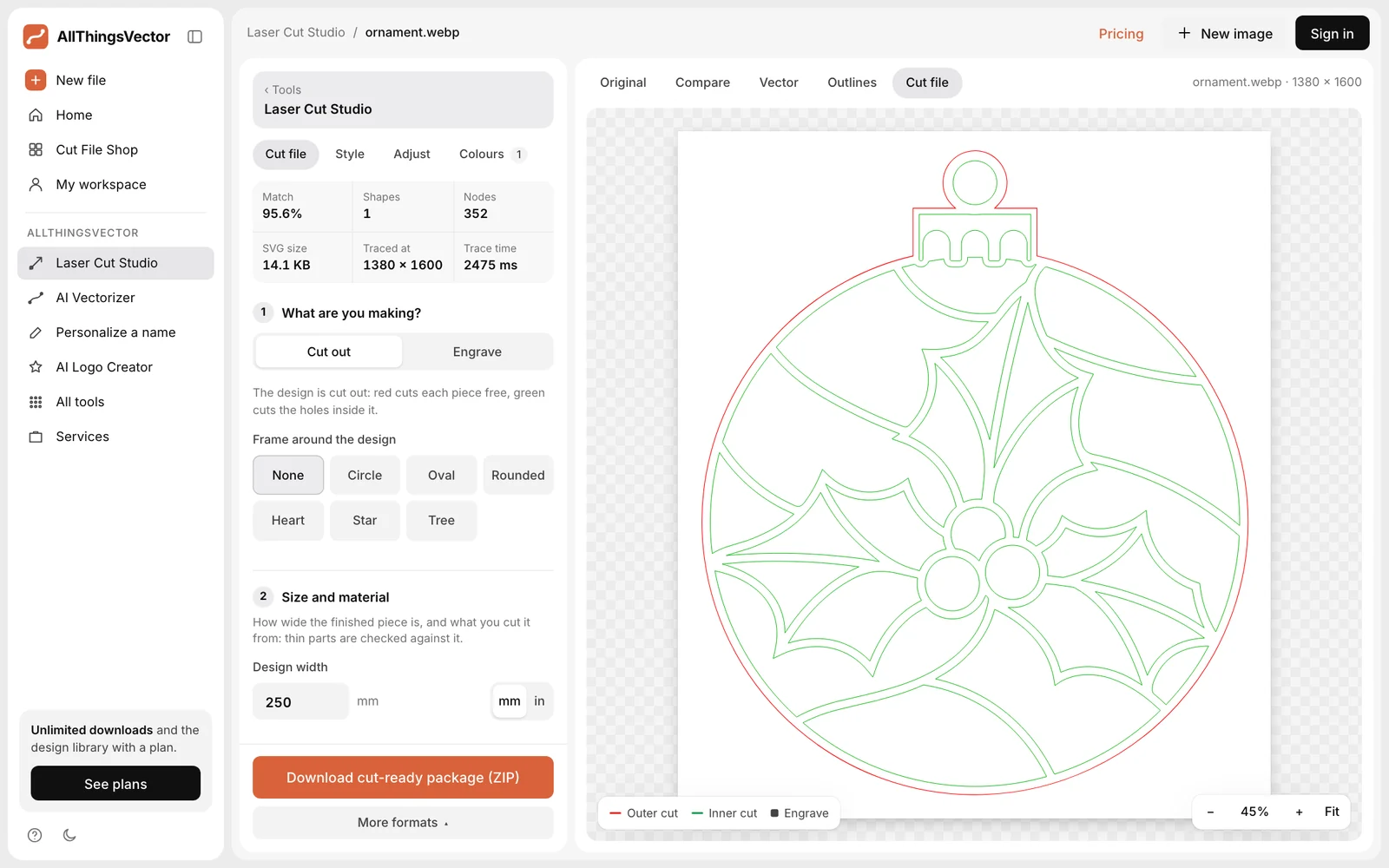
Most "best vectorizer" lists judge tools on logos and print. Laser and Cricut makers need more: a closed outline that cuts cleanly, the right line colours for your machine, a real size in millimetres, and a file your software opens without a fight. This guide compares AllThingsVector with the seven tools crafters and Etsy sellers ask about most, using the vendors' own pricing and help pages, plus our own measured tests.
Full disclosure: we make AllThingsVector. Below we show where it wins and where it doesn't, using numbers you can check.
The short answer
- Best for laser and Cricut cut files from an image: AllThingsVector Laser Cut Studio. It traces in your browser (nothing is uploaded), gives you red outer cuts and green inner cuts, checks for loose pieces and thin parts, and downloads SVG, DXF, PDF and EPS in one package.
- Best pure image tracing, especially painted or photo-like art: Vectorizer.AI. In our test it matched painted artwork more closely than we did, and it uses fewer anchor points.
- Best if you already design in it: Adobe Illustrator (Image Trace) or Inkscape (free Trace Bitmap). Both are full editors, so you can fix anything by hand.
- Best if you only run a laser: LightBurn's Trace Image, which is already in the software that drives your laser.
- Fine for quick, simple shapes on the machine you own: Cricut Design Space upload or Silhouette Studio Trace.
Comparison table
Prices are US prices shown on each vendor's site on 23 November 2026 and can change. Links to every source are further down.
| Tool | Price | Where the image goes | Cut-file formats out | Laser and Cricut help |
|---|---|---|---|---|
| AllThingsVector | Free: 5 downloads. Maker $10/month or $99/year | Traced in your browser; nothing is uploaded | Laser SVG (mm), Cricut SVG, DXF, PDF, EPS, PNG | Red/green cut layers, engrave, frames, bridges, names, thin-part and loose-piece checks |
| Vectorizer.AI | $9.99/month to download; previews free | Uploaded to their servers | SVG, PDF, EPS, DXF, PNG | Cutting and engraving preset (thin strokes), DXF options |
| Vector Magic | Online $4.99/month; Desktop $295 once | Online: uploaded. Desktop: on your computer | Online: SVG, PDF, EPS. Desktop adds AI and DXF | "Fill only" output for cutting |
| Adobe Illustrator | $22.99/month (annual plan); 7-day free trial | On your computer | SVG, PDF, EPS, DXF, AI | None built in; you set up layers yourself |
| Inkscape | Free and open source | On your computer | SVG, PDF, EPS, DXF | None built in; you set up layers yourself |
| LightBurn | Core $99 or Pro $199, one-time; 30-day free trial | On your computer | Sends traced shapes straight to your laser job | Traces straight onto your laser layers |
| Cricut Design Space | Free upload; some tools need Cricut Access ($9.99/month) | Uploaded to your Cricut account | No SVG or DXF export documented | Cuts on your Cricut |
| Silhouette Studio | Trace is free; SVG/PDF export needs Business Edition ($99.99 list) | On your computer | Studio files; SVG/PDF/PNG/JPG with Business | Trace, outer edge, trace and detach |
How we tested
We ran two tests on 23 November 2026, with the current version of our tracer.
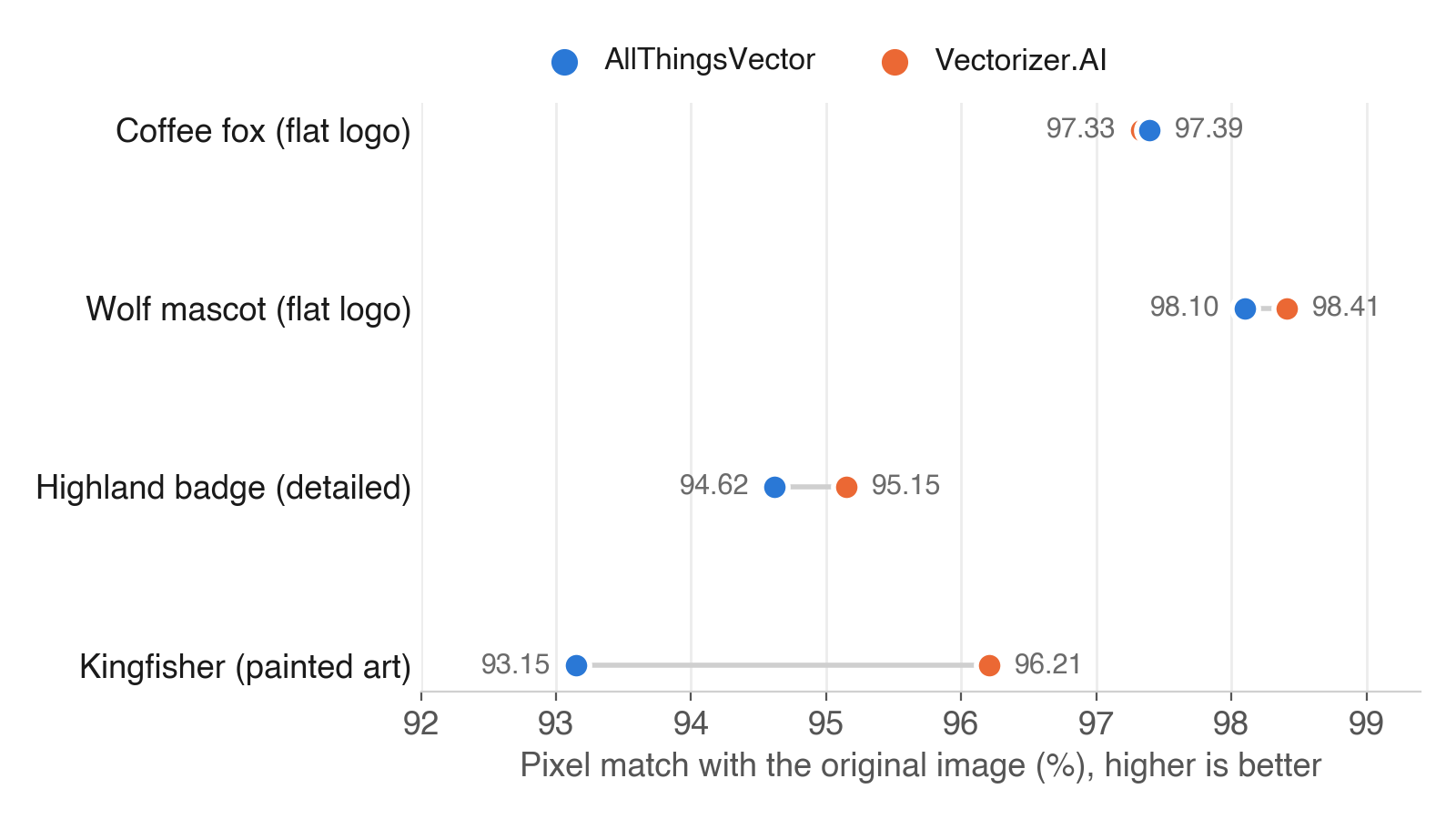
Test 1: AllThingsVector vs Vectorizer.AI on the same four images. We exported Vectorizer.AI SVGs of four images in October 2026: two flat logos, a detailed badge and a painted bird. Both tools' SVGs were drawn the same way in the browser at the same size, then compared with the original image. The score measures how closely the colours match along every edge in the image, where tracing goes wrong. 100 would be a perfect copy. We also counted anchor points, because fewer points means a smoother, lighter file.
Test 2: laser silhouettes against the designer's own paths. We took 38 laser and Cricut designs drawn by hand in Illustrator, rendered them as images and made them worse on purpose: an 800 px JPEG at quality 70 (a typical customer upload) and a 500 px PNG (a small screenshot). We traced those with AllThingsVector and measured how far our outline sits from the designer's original outline, in pixels at 1600 px wide. We did not run the other tools on this set.
Results: AllThingsVector vs Vectorizer.AI
| Image | AllThingsVector | Vectorizer.AI | Anchor points (ours / theirs) |
|---|---|---|---|
| Coffee fox (flat logo) | 97.39 | 97.33 | 1,386 / 837 |
| Wolf mascot (flat logo) | 98.10 | 98.41 | 3,472 / 2,305 |
| Highland badge (detailed) | 94.62 | 95.15 | 8,453 / 6,782 |
| Kingfisher (painted art) | 93.15 | 96.21 | 44,433 / 15,057 |
What this means:
- Flat logos and silhouettes, the kind most laser and Cricut designs are: a near tie. We were slightly ahead on the fox and 0.31 behind on the wolf.
- Detailed and painted art: Vectorizer.AI is better. It keeps more close shades (94 colours on the kingfisher against our 46), so painted art looks closer to the original. If you vectorize paintings or photos for print, it is the stronger tracer.
- Vectorizer.AI uses fewer anchor points on all four images, between about 20% and 66% fewer. Fewer points make a file lighter and easier to edit by hand. For cutting this matters less than outline accuracy, but it is a real advantage.
Results: laser silhouettes from poor images
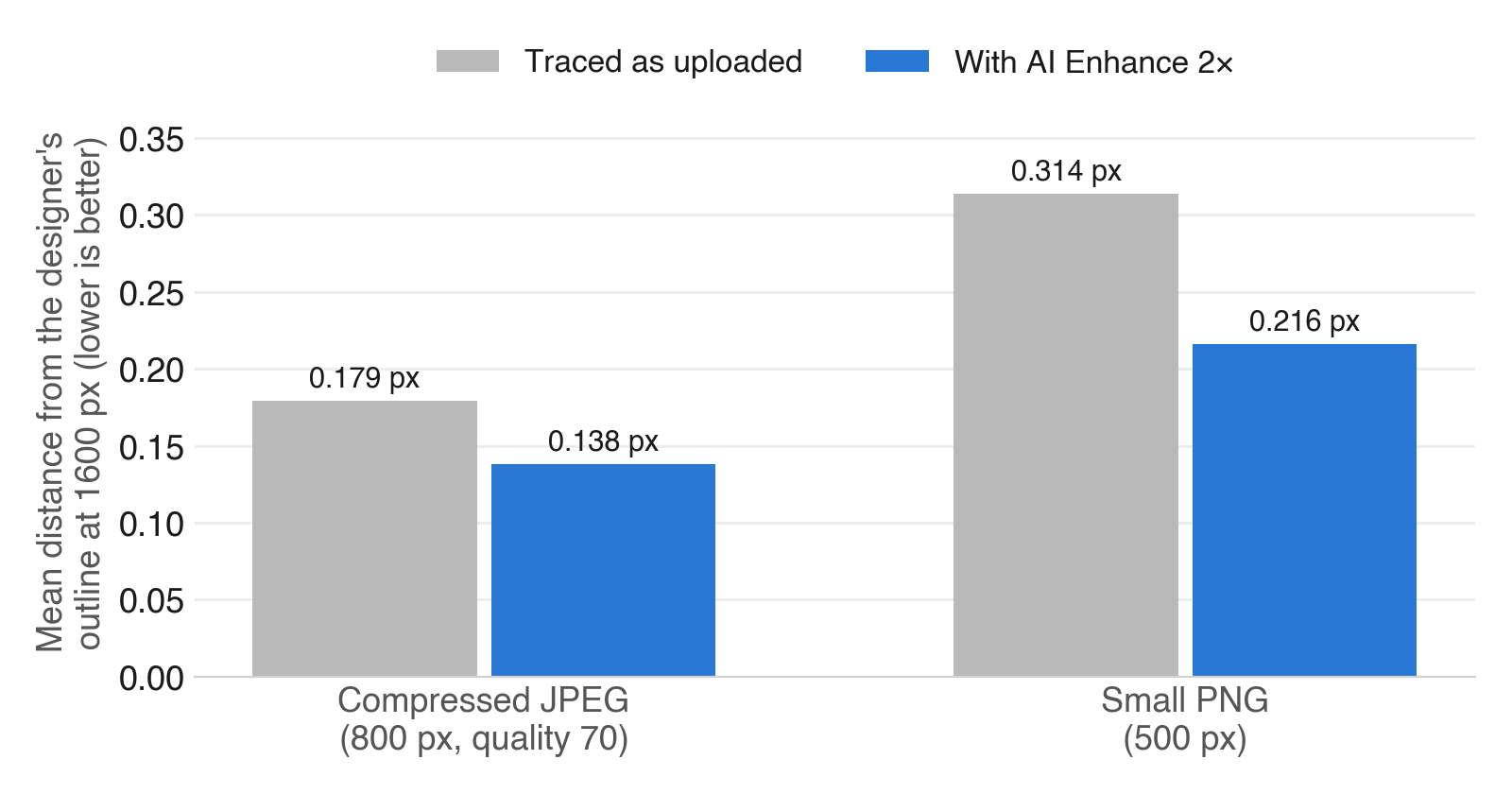
On the 38 hand-drawn designs, our traced outline sits on average 0.138 px from the designer's line on the compressed JPEGs and 0.216 px on the small PNGs, measured at 1600 px wide. On a 250 mm sign that is about 0.02 mm and 0.03 mm.
The biggest help is AI Enhance, which sharpens a small or blurry image to twice its size before tracing. It cut the error by 23% on the JPEGs and 31% on the small PNGs. It runs on your computer's processor, with no graphics card needed and no upload. Our traces also used fewer points than the designers did: about 0.76 times their count on the JPEGs and 0.65 times on the small PNGs.
What a cut file needs that tracing alone doesn't give you
A traced SVG is only half a cut file. Before it reaches your laser or Cricut, someone has to:
- Colour the lines your machine expects: an outer cut that frees the piece, inner cuts for the holes, and filled areas to engrave.
- Set a real size, in millimetres or inches, so it doesn't import tiny or huge.
- Find parts that will fall out (an O's middle, a loose eye) and add bridges, or put the design in a frame.
- Check that no part is thinner than your material can hold.
- Export the formats your buyers ask for: SVG for Glowforge and Cricut, DXF for LightBurn and CAD, plus PDF and EPS.
Most vectorizers stop at tracing. In Illustrator or Inkscape you do steps 1 to 5 by hand. Laser Cut Studio does them in the same screen you trace in, as in the picture at the top of this article: red outer cut, green inner cuts, size in millimetres and the checks, ready to download.
You can also drop in a vector you already own (SVG, AI, EPS or PDF). Its exact paths become the cut file and nothing is retraced.
Each tool, in more detail
AllThingsVector Laser Cut Studio
Good: made for cut files. Red outer cuts, green inner cuts and black engraving, real millimetres, frames (circle, oval, heart, star, tree and more), hanging loops, bridges, names joined into the design, and checks for loose pieces, tiny holes and thin parts. One download gives a Glowforge/LightBurn SVG, a Cricut SVG, a layered DXF, PDF, EPS, a 300 dpi PNG and a listing mockup. Tracing happens in your browser, so your artwork stays on your computer. Accepts PNG, JPG, WebP, AVIF, GIF, BMP, SVG, AI, EPS and PDF up to 40 MB.
Not so good: behind Vectorizer.AI on painted and photo-like art, and it uses more anchor points. It is not a full vector editor like Illustrator or Inkscape. You need a free account to download, and the free plan has 5 downloads. See plans.
Vectorizer.AI
Good: the closest match to detailed and painted colour art in our test. Free to upload and preview as much as you like; downloading costs $9.99 a month. Exports SVG, PDF, EPS, DXF and PNG, has palette and shape editing, and offers a cutting and engraving preset that draws outlines as thin strokes, with DXF line, arc and spline options.
Not so good for cut files: no cut and engrave layers, bridges, frames or thin-part checks. The web app takes images up to 3 megapixels and 30 MB. Images are uploaded to their servers: the home page says they keep uploads for 24 hours, while their terms say files expire two weeks after upload. The terms also allow them to use uploads to train and improve their models, with no individual opt-out.
Vector Magic
Good: from the same company as Vectorizer.AI. The online edition is $4.99 a month; the Desktop Edition is a one-time $295 and converts images offline. "Fill only" output suits cutting. Desktop exports DXF (Windows only) and AI.
Not so good: online images over 2 megapixels are scaled down, and online exports are SVG, PDF and EPS only (no DXF). Online uploads go to their servers under the same kind of terms as Vectorizer.AI. No cutter-specific tools.
Adobe Illustrator Image Trace
Good: the industry-standard editor. Image Trace has presets (Auto-Color, High Color, Low Color, Grayscale, Black and White, Outline), colour limits, path and corner sliders, noise control, and a choice of fills or strokes. After tracing you can edit every point, then save as AI, PDF, EPS or SVG, or export DXF and DWG.
Not so good: $22.99 a month on the annual plan ($34.49 month to month), and the cut setup is all manual: colouring cut and engrave lines, sizing, bridges and checks. Adobe's newer "Concept to Vector" feature works differently: it needs an internet connection and uses generative credits.
Inkscape Trace Bitmap
Good: free and open source (GPL), for Windows, Mac and Linux, and the current version is 1.4.4. Trace Bitmap offers brightness cutoff (good for silhouettes), edge detection, colour quantization, multiple scans for colour layers, and centerline tracing for single-line engraving. It saves SVG natively and can save DXF for cutting plotters, plus PDF and EPS.
Not so good: tracing quality depends heavily on the settings and the source image, and there are no laser or Cricut presets: you colour, size and check the cut lines yourself. Expect a learning curve.
LightBurn Trace Image
Good: if you run a laser you may already own it. Trace Image traces straight into your laser job, with a brightness cutoff and threshold, Ignore Less Than to drop specks, smoothness and optimise sliders, transparency tracing, centre line tracing and a sketch mode for handwriting. A licence is one payment (Core $99, Pro $199) with a 30-day free trial.
Not so good: it traces one brightness range at a time, so it suits black-and-white art better than multi-colour images, and it's laser-only: it won't give you a Cricut SVG or a file package to sell.
Cricut Design Space
Good: free image upload with Select, Erase, Restore, Reduce Colors and Crop for everyone. SVG and DXF uploads arrive cut-ready, split into layers.
Not so good: the automatic Background Remover and Convert to Layers (Beta) need Cricut Access ($9.99/month in the US). Uploading needs an internet connection and saves images to your Cricut account. SVGs over 5,000 paths are refused. Cricut's help centre documents no way to export SVG or DXF, so a design you clean up there stays in Design Space.
Silhouette Studio
Good: Trace (all lines, outer edge only, or trace and detach from the background) is in every edition, including the free Basic one, and Studio runs on your own computer.
Not so good: opening SVG or PDF needs Designer Edition ($49.99 list price), and saving as SVG, PDF, PNG or JPG needs Business Edition ($99.99 list price; both were on sale when we checked). The Basic edition saves only Studio files, so you can't sell its output as SVGs.
Which should you choose?
- You sell laser or Cricut files on Etsy: use a tool that makes the whole package. Try Laser Cut Studio free, then check the result in your machine's software before you list it.
- You trace complex colour art for print: Vectorizer.AI.
- You need to redraw or edit shapes by hand: Inkscape (free) or Illustrator. Read Vector Magic and Vectorizer.AI alternatives for when a full editor beats a tracer.
- The source is too blurry for any tracer: see how to turn a blurry logo into a clean vector file, or have a designer draw the cut file for you.
FAQ
What is the best free vectorizer for laser cutting?
Inkscape's Trace Bitmap is free with no limits, but you set up the cut layers yourself. AllThingsVector gives you 5 free cut-file downloads with layers, sizing and checks done for you. Silhouette Studio's free Basic edition can trace but can't export SVG.
Is Vectorizer.AI good for Cricut and laser files?
Its tracing is excellent, and it has a cutting and engraving preset. What it doesn't do is make a cut file: no outer and inner cut layers, bridges, frames or checks for parts that would fall out. You would finish the file in another program.
Does Vectorizer.AI upload my images?
Yes. Vectorizer.AI processes images on its servers, and its terms let it use uploads to improve its models. AllThingsVector traces in your browser, so your image is not uploaded.
Can Cricut Design Space save my traced image as an SVG?
Cricut's help centre documents no SVG or DXF export. You can cut from Design Space, but you can't sell or share the cleaned-up file as an SVG.
Which file format should I use for my laser?
Glowforge and xTool Creative Space work well with SVG; LightBurn opens SVG and DXF; Cricut Design Space and Silhouette take SVG (Silhouette Basic takes DXF). Laser Cut Studio's package includes all of them, with sizes in millimetres.
How accurate is AllThingsVector?
On flat logos it scored within about 0.3 of Vectorizer.AI in our test, and slightly ahead on one. On painted art it was 3 points behind. On 38 hand-drawn laser designs, the traced outline was on average 0.14 px from the designer's line from a compressed JPEG at 1600 px, about 0.02 mm on a 250 mm piece.
Sources
All checked on 23 November 2026.
- Vectorizer.AI: pricing, home page and FAQ, output options, terms
- Vector Magic: pricing, desktop edition, file formats, FAQ, terms
- Adobe Illustrator: plans, Image Trace options, file formats, generative AI FAQ
- Inkscape: licence, 1.4.4 release, tracing an image
- LightBurn: home page and FAQ, Core, Pro, Trace Image guide
- Cricut: uploading images, offline feature, Cricut Access
- Silhouette: Basic edition trace features, file types by edition, Silhouette Studio editions and prices
- AllThingsVector: our measurements (test 1 and 2 above) and our pricing